 aleidk
224c7ed45c
aleidk
224c7ed45c
Move config files from config to chezmoi
Add script to auto install packages with DNF and Cargo
191 lines
8.5 KiB
Markdown
191 lines
8.5 KiB
Markdown
# extrakto for tmux
|
|
|
|
|
|
|
|
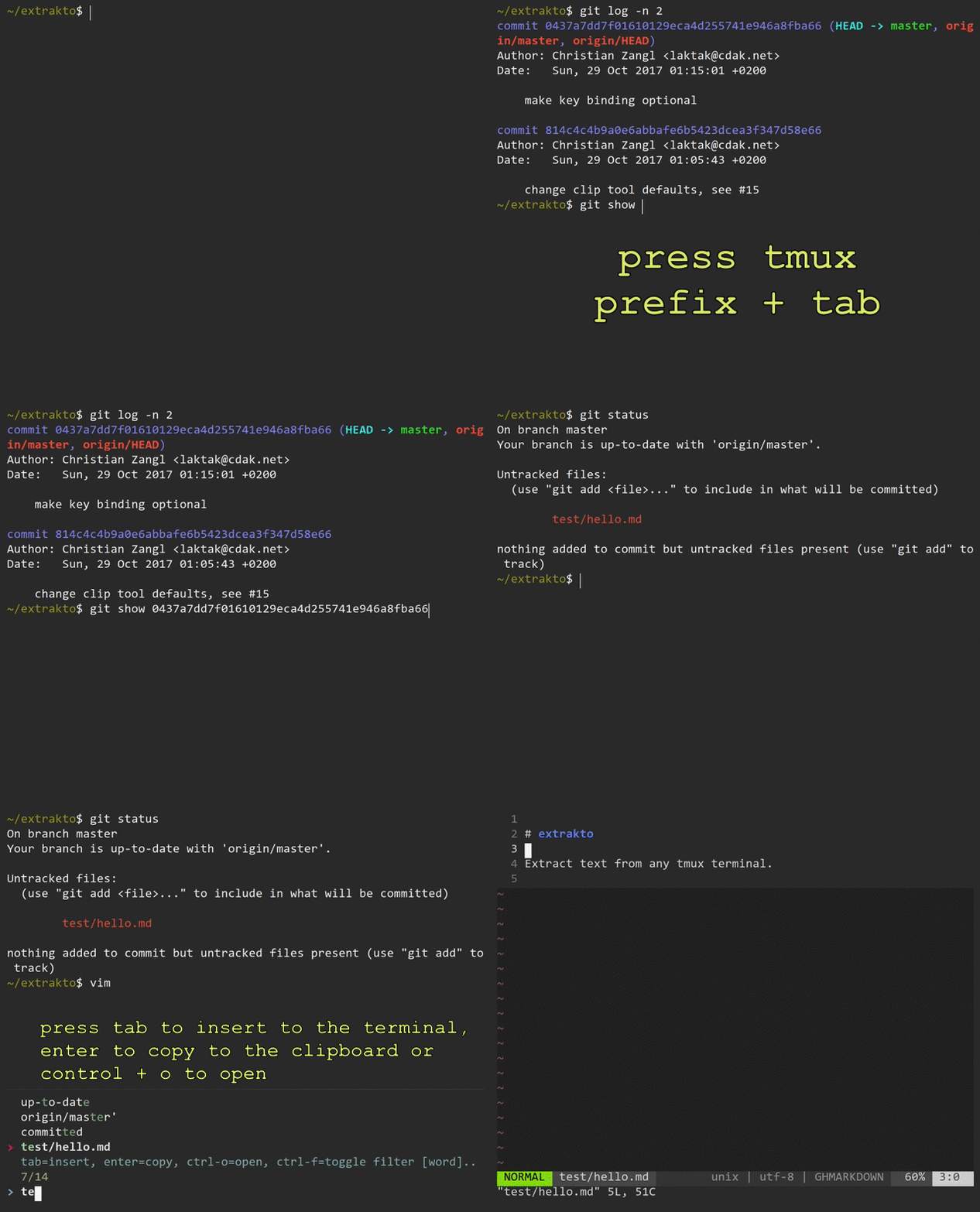
**Output completions** - you can complete commands that require you to retype text that is already on the screen. This works everywhere, even in remote ssh sessions.
|
|
|
|
You can **fuzzy find your text** instead of selecting it by hand:
|
|
|
|
- press tmux `prefix + tab` to start extrakto
|
|
- fuzzy find the text/path/url/line
|
|
- use custom filters (`ctrl + f`)
|
|
- press
|
|
- `tab` to insert it to the current pane,
|
|
- `enter` to copy it to the clipboard,
|
|
- see other features in [HELP](HELP.md) (press `ctrl-h` in extrakto)
|
|
|
|
Use it for paths, URLs, options from a man page, git hashes, docker container names, ...
|
|
|
|
## Requirements
|
|
|
|
- [tmux](https://github.com/tmux/tmux) - popups require 3.2, otherwise extrakto will open in a split window.
|
|
- [fzf](https://github.com/junegunn/fzf)
|
|
- Python 3.6+
|
|
- Bash (tested with 5.0+, on macOS please `brew install bash` first)
|
|
see the [Wiki for Bash 4 support](https://github.com/laktak/extrakto/wiki/Bash4)
|
|
|
|
Supported clipboards:
|
|
|
|
- Linux Xorg (xclip) and Wayland (wl-copy)
|
|
- macOS (pbcopy)
|
|
- WSL (aka "Bash on Windows")
|
|
- *bring your own*, see the [Wiki](https://github.com/laktak/extrakto/wiki/) for examples (like termux)
|
|
|
|
## Installation with [Tmux Plugin Manager](https://github.com/tmux-plugins/tpm)
|
|
|
|
Add the plugin to the list of TPM plugins in `.tmux.conf`:
|
|
|
|
set -g @plugin 'laktak/extrakto'
|
|
|
|
Hit `prefix + I` to fetch the plugin and source it.
|
|
|
|
You should now have all `extrakto` key bindings defined.
|
|
|
|
## Manual Installation
|
|
|
|
Clone the repo:
|
|
|
|
$ git clone https://github.com/laktak/extrakto ~/clone/path
|
|
|
|
Add this line to the bottom of `.tmux.conf`:
|
|
|
|
run-shell ~/clone/path/extrakto.tmux
|
|
|
|
Reload the tmux environment:
|
|
|
|
# type this in terminal
|
|
$ tmux source-file ~/.tmux.conf
|
|
|
|
You should now have all `extrakto` key bindings defined.
|
|
|
|
## Wiki
|
|
|
|
Add or look for special tips in our [wiki](https://github.com/laktak/extrakto/wiki).
|
|
|
|
## Options
|
|
|
|
To set any of these options write on your `~/.tmux.conf` file:
|
|
|
|
```
|
|
set -g <option> "<value>"
|
|
```
|
|
|
|
Where `<option>` and `<value>` are one of the specified here below
|
|
|
|
### Common Options
|
|
|
|
| Option | Default | Description |
|
|
| :--- | :---: | :--- |
|
|
| `@extrakto_grab_area` | `window full` | Whether you want extrakto to grab data from the `recent` area, the `full` pane, all current window's (`window recent`) areas or all current window's (`window full`) panes. You can also set this option to any number you want (or number preceded by "window ", e.g. "window 500"), this allows you to grab a smaller amount of data from the pane(s) than the pane's limit. For instance, you may have a really big limit for tmux history but using the same limit may end up on having slow performance on Extrakto. |
|
|
| `@extrakto_filter_order` | `word all line` | Filter modes order. The first listed mode will be the default when opening extrakto. You may use `word`, `line`, `path`, `url`, `quote`, `s-quote` or any of your own filters separated by a space. `all` applies all filters at the same time. |
|
|
|
|
### Keys
|
|
|
|
| Option | Default | Description |
|
|
| :--- | :---: | :--- |
|
|
| `@extrakto_key` | `tab` | The key binding to start. If you have any special requirements (like a custom key table) set this to 'none' and define a binding in your `.tmux.conf`. See `extrakto.tmux` for a sample. |
|
|
| `@extrakto_copy_key` | `enter` | Key to copy selection to clipboard. |
|
|
| `@extrakto_insert_key` | `tab` | Key to insert selection. |
|
|
| `@extrakto_filter_key` | `ctrl-f` | Key to toggle filter mode. |
|
|
| `@extrakto_grab_key` | `ctrl-g` | Key to toggle grab mode. |
|
|
| `@extrakto_edit_key` | `ctrl-e` | Key to run the editor. |
|
|
| `@extrakto_open_key` | `ctrl-o` | Key to run the open command. |
|
|
|
|
All but `@extrakto_key` are controlled by fzf and must follow its conventions.
|
|
|
|
### Advanced Options
|
|
|
|
| Option | Default | Description |
|
|
| :--- | :---: | :--- |
|
|
| `@extrakto_clip_tool_run` | `bg` | Set this to `tmux_osc52` to enable [remote clipboard support](https://github.com/laktak/extrakto/wiki/Remote-Copy-via-OSC52) or `fg`/`bg` to have your clipboard tool run in a foreground/background shell. |
|
|
| `@extrakto_clip_tool` | `auto` | Set this to whatever clipboard tool you would like extrakto to use to copy data into your clipboard. `auto` will try to choose the correct clipboard for your platform. |
|
|
| `@extrakto_editor` | | This defaults to `$EDITOR` if not set. |
|
|
| `@extrakto_fzf_layout` |`default` | Control the fzf layout which is "bottom-up" by default. If you prefer "top-down" layout instead set this to `reverse`. In fact, this value is passed to the fzf `--layout` parameter. Possible values are: `default`, `reverse` and `reverse-list` |
|
|
| `@extrakto_fzf_tool` | `fzf` | Set this to path of fzf if it can't be found in your `PATH`. |
|
|
| `@extrakto_fzf_unset_default_opts` | `true` | Unsets custom FZF_DEFAULT_OPTS as it can potentially cause problems in extrakto operations |
|
|
| `@extrakto_open_tool` | `auto` | Set this to path of your own tool or `auto` to use your platforms *open* implementation. |
|
|
| `@extrakto_popup_position` | `C` | Set position of the tmux popup window. Possible values are in the `display-popup` entry in `man tmux`. Set this to `x,y` to set the x and y positions to `x` and `y` respectively. |
|
|
| `@extrakto_popup_size` | `90%` | Set width and height of the tmux popup window. Set this to `w,h` to set the width to `w` and height to `h`. |
|
|
| `@extrakto_split_direction` | `a` | Whether the tmux split will be `a`uto, `p`opup, `v`ertical or `h`orizontal |
|
|
| `@extrakto_split_size` | `7` | The size of the tmux split (for vertical/horizontal) |
|
|
|
|
### Examples
|
|
|
|
```
|
|
set -g @extrakto_split_size "15"
|
|
set -g @extrakto_clip_tool "xsel --input --clipboard" # works better for nvim
|
|
set -g @extrakto_copy_key "tab" # use tab to copy to clipboard
|
|
set -g @extrakto_insert_key "enter" # use enter to insert selection
|
|
set -g @extrakto_fzf_unset_default_opts "false" # keep our custom FZF_DEFAULT_OPTS
|
|
```
|
|
|
|
## Custom Filters
|
|
|
|
You can define your own filters by creating a file in `~/.config/extrakto/extrakto.conf`:
|
|
|
|
```
|
|
[quote]
|
|
regex: ("[^"\n\r]+")
|
|
```
|
|
|
|
To override an existing filter copy it to your file first.
|
|
|
|
If you want to remove one of the alternate filters you can set it to `None`:
|
|
|
|
```toml
|
|
[quote]
|
|
alt2: None
|
|
```
|
|
|
|
See [extrakto.conf](extrakto.conf) for syntax and predefined filters.
|
|
|
|
|
|
---
|
|
|
|
# CLI
|
|
|
|
You can also use extrakto as a standalone tool to extract tokens from text.
|
|
|
|
## Installation
|
|
|
|
For now simply clone the repository and link to the tool somewhere in your path:
|
|
|
|
```
|
|
git clone https://github.com/laktak/extrakto
|
|
cd extrakto
|
|
# assuming you `export PATH=$PATH:~/.local/bin` in your `.bashrc`:
|
|
ln -s $PWD/extrakto.py ~/.local/bin/extrakto
|
|
```
|
|
|
|
Requires Python 3.6+.
|
|
|
|
## CLI Usage
|
|
|
|
```
|
|
usage: extrakto.py [-h] [--name] [-w] [-l] [--all] [-a ADD] [-p] [-u] [--alt] [-r] [-m MIN_LENGTH] [--warn-empty]
|
|
|
|
Extracts tokens from plaintext.
|
|
|
|
optional arguments:
|
|
-h, --help show this help message and exit
|
|
--name prefix filter name in the output
|
|
-w, --words extract "word" tokens
|
|
-l, --lines extract lines
|
|
--all extract using all filters defined in extrakto.conf
|
|
-a ADD, --add ADD add custom filter
|
|
-p, --paths short for -a=path
|
|
-u, --urls short for -a=url
|
|
--alt return alternate variants for each match (e.g. https://example.com and example.com)
|
|
-r, --reverse reverse output
|
|
-m MIN_LENGTH, --min-length MIN_LENGTH
|
|
minimum token length
|
|
--warn-empty warn if result is empty
|
|
```
|
|
|
|
# Contributions
|
|
|
|
Thanks go to all contributors for their ideas and PRs!
|
|
|
|
**If you make a PR, please keep it small so that it's easier to test and review. Try to create one PR per feature/bug.**
|
|
|
|
Please run `black` if you change any python code and run `shfmt` if you change any bash files.
|