
2 KiB
Yet another Full Disk Encryption for GRUB/Linux
Helpful scripts of the full disk encryption for the Linux distribution
This is a script correction to help the installation of Linux distribution with the full disc encryption. Followings are the list of functionality.
- Ubuntu and Void Linux.
- Install from LiveCD/USB.
- Use GUI installer, for the ease of installation.
- Automatic detection of BIOS/EFI firmware and create MBR/GPT, respectively.
- Support to install multiple distributions in a LUKS partition.
- The "/boot" is located in the same logical volume with the "/".
- The swap logical volume is located inside encrypted volume.
- You need to type a passphrase only once in the boot sequence.
With the configuration parameters, you can customize each installation. For example, you can configure the system to have 2, 3 or 4,... distributions in a HDD/SSD, as you want.
Following is the HDD/SSD partitioning plan of these scripts ( In case of BIOS, the disk has MBR and doesn't have EFI partition, while it is depicted here).
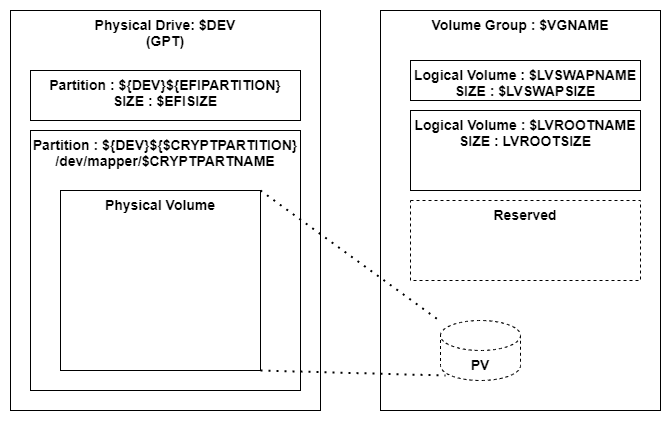
The logical volume size of each Linux distribution (LVROOTSIZE) can be customized from a configuration parameter. Also, the swap volume size is customizable.
As depicted the LVM volume group has only one physical volume.
Test environment
These scripts are tested with following environment.
- VMWare Workstation 15.5.7 ( EFI/BIOS )
- Ubuntu 20.04.2 amd64 desktop
- Ubuntu Mate 20.04.2 amd64 desktop
Preparation
Stat the PC with the LiveCD/LiveUSB of the distribution to install. Download this repository from github, and expand it.
Installation
- Ubuntu : Go to the ubuntu sub-directory and follow the procedure in the INSTALL-ubuntu.md
Acknowledgments
These scripts are based on the script shared on the myn's diary. That page contains rich information, hint and techniques around the encrypted volume and Ubiquity installer.