|
|
||
|---|---|---|
| image | ||
| script | ||
| INSTALL.md | ||
| LICENSE | ||
| README.md | ||

Kaiten-yaki : Yet another Full Disk Encryption for GRUB/Linux
Kaiten-yaki is a script set to help you to make a full disk encryption install to your desktop system.
Followings are the list of functionality.
- Support Ubuntu and Void Linux.
- Install from LiveCD/USB.
- Invoke GUI/TUI installer at the middle of script execution, for the ease of installation.
- Automatic detection of BIOS/EFI firmware and create MBR/GPT, respectively.
- Support to install multiple distributions in a LUKS partition.
- The "/boot" is located in the same logical volume with the "/".
- The swap logical volume is located inside encrypted volume.
- You need to type a passphrase only once in the boot sequence.
With the configuration parameters, you can customize each installation. For example, you can configure the system to have 2, 3 or 4,... distributions in a HDD/SSD, as you want.
Following is the HDD/SSD partitioning plan of these scripts ( In case of BIOS, the disk has MBR and doesn't have EFI partition, while it is depicted here).
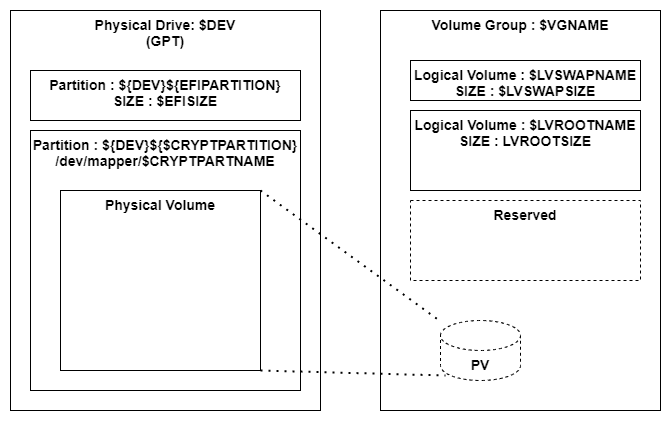
The logical volume size of each Linux distribution (LVROOTSIZE) can be customized from a configuration parameter. Also, the swap volume size is customizable.
As depicted above, the LVM volume group has only one physical volume.
Tested environment
These scripts are tested with following environment.
- VMWare Workstation 15.5.7 ( EFI/BIOS )
- Ubuntu 20.04.2 amd64 desktop
- Ubuntu Mate 20.04.2 amd64 desktop
- void-live-x86_64-20210218-mate.iso
- void-live-x86_64-musl-20210218-mate.iso
Installation
Start the PC with the LiveCD/LiveUSB of the distribution to install. Download this repository from github, and expand it.
Then, go to script directory and follow the procedure in the INSTALL.md
Known issues
If you install two or more Void Linux in to the EFI system, only the last one can boot without trouble. This is not the problem of Kaiten-yaki.
Variants considerations
Ubuntu has several variants ( flavors ). While I have tested only MATE flavor, other flavor may work correctly as far as it uses Ubiquity installer.
Void Linux has "base" variant which doesn't have GUI. Kaiten-yaki can't run correctly without GUI.
Acknowledgments
These scripts are based on the script shared on the myn's diary. That page contains rich information, hint and techniques around the encrypted volume and Ubiquity installer.
Also, following documents were very important to study how Void Linux installation works.
- Full Disk Encryption in the Void Handbook.
- Install LVM LUKS (deprecated)
Kaiten-yaki